Kdenlive 26.04 is Out with Animated Transition Preview & Screen Mirroring

KDE announced the release of KDE Gear 26.04 on Thursday, including Kdenlive 26.04 the popular video editor.
The new version of this free open-source Qt and MLT based video editor introduced many exciting new features.
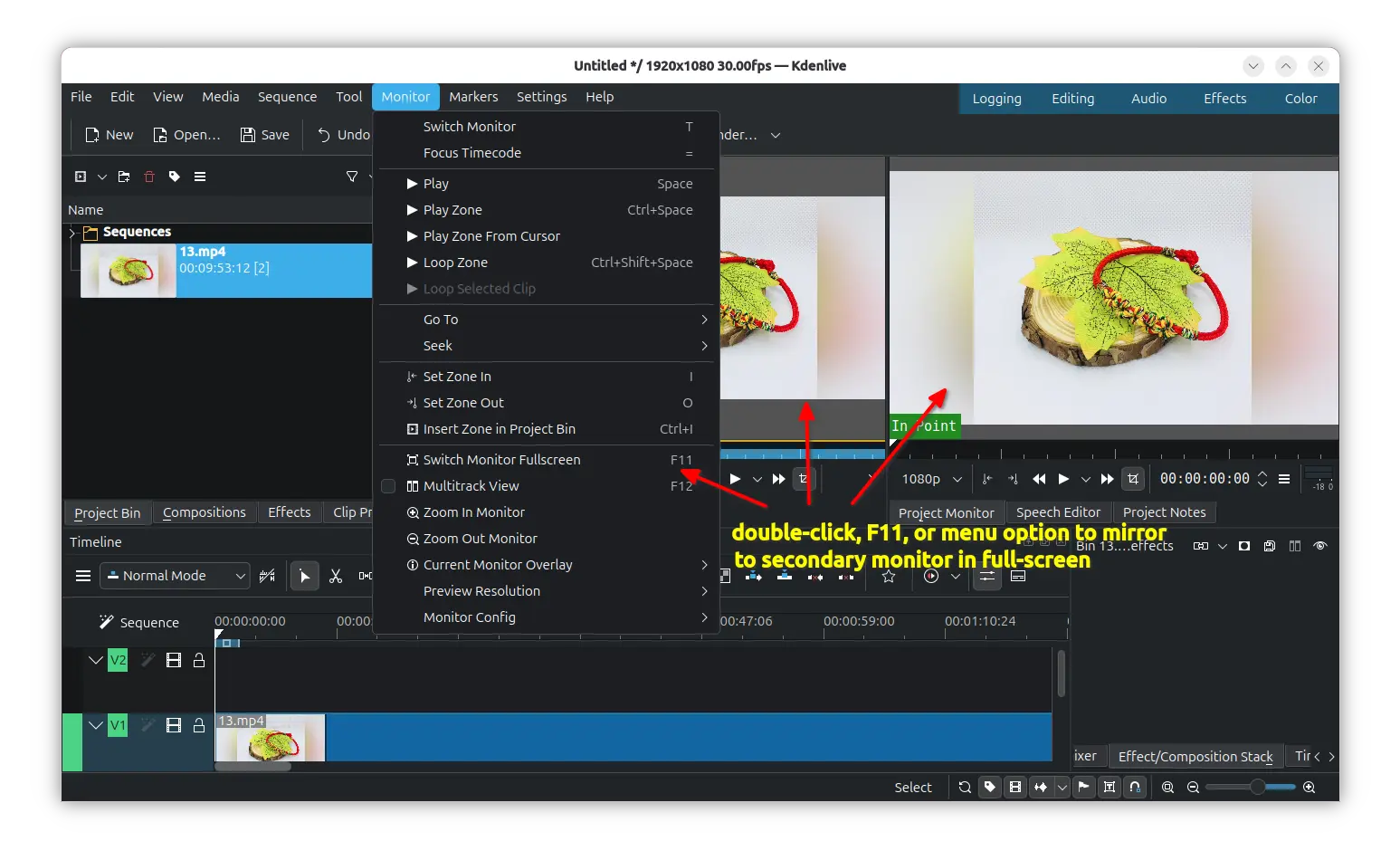
First, for multiple monitor users, the new Kdenlive 26.04 added screen mirroring feature. Instead of detaching, it can now mirror video preview to external monitor in full-screen. So that you can now preview video clips both in usual interface and larger view at the same time.
To enable the feature go to Settings -> Configure Kdenlive -> Preview -> Mirror monitor on fullscreen. After that, you may double-click, press F11, or use the Monitor -> Switch Monitor Fullscreen menu option, to mirror the video preview to external monitor.
The new version also introduced animated transition preview support.
In Compositions, a new icon view toggle is added to display items in small thumbnail previews. And, the transitions that can connect video clips with fading, sliding etc animations are now animated when you move mouse cursor over the thumbnails, making easier to know what they do.
As well, it added new filter to show luma only files, and button to generate previews.
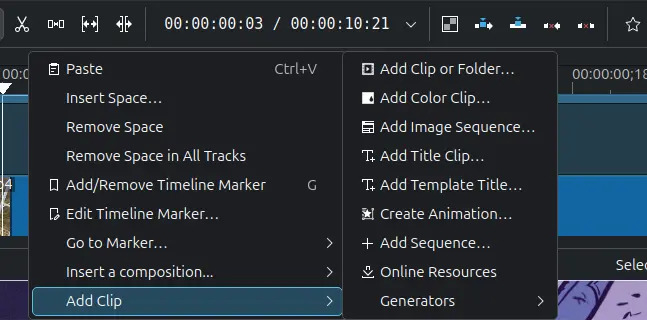
In Kdenlive 26.04, you can now add clips using timeline context menu.
Just right-click in blank area in timeline, and go to “Add Clip” sub-menu. Then, you’ll be able to add a video clip, color clip, image sequence, title clip, online resources, create animation or generate counter, color bars, or white noise at the clicked position.
You can now select multiple clips and change the speed at the same time. Drag’n’drop a transition to the timeline will automatically adjust its duration to the above/below clips. And, a new option is added to always zoom on the mouse position instead of the timeline playhead.
Other changes include:
- Add clear undo history in Edit menu.
- Generate audio thumbnails for sequences.
- Add back delete all timeline markers action.
- Add missing HD-ready (1366×768) project profiles.
- Include “Add Clip” actions in context menu for folders in Project Bin.
- Add “Add to Project Bin” option to Render Widget.
- Improve drag and drop preview to different tracks on the timeline.
For more about Kdenlive 26.04, either see the commits in source page, or wait for the official release note in Kdenlive website.
Get Kdenlive 26.04
The official installers for Linux, Windows, and macOS are not ready at the moment of writing. Though, they will be soon available to download in KDE website via the link below:
For Linux, there’s also a Flatpak package which is also not updated at the moment of writing.
For Ubuntu users who prefer the native .deb package, I’ve built the new release package into this unofficial PPA for Ubuntu 26.04.
Simply open terminal (Ctrl+Alt+T) and run commands below one by one to get it:
sudo add-apt-repository ppa:ubuntuhandbook1/kdenlive
sudo apt update
sudo apt install kdenlive qt6-image-formats-plugins
Here qt6-image-formats-plugins is required for displaying the transition previews. For Ubuntu 25.10, I’ll add the build soon in next few days.
Source: UbuntuHandbook