LibreOffice 26.8 Released with OpenType Font Variations & Improved RTL

LibreOffice, the popular office suite that’s default in many Linux Distributions, released new major 26.8 version on Wednesday.
The new version of this free open-source software features RTL (right-to-left) and bidirectional text support, improved Microsoft Office compatibility, stronger scripting, and various improvements.
The Writer app now has better handling for Right to Left and bidirectional text that contains both left-to-right (LTR) and right-to-left (RTL) writing directions.
It now detects paragraph direction for RTL text automatically when documents or plain text are opened or pasted. And, Show Formatting Marks now makes format characters for bidirectional text visible.
Start is now the default paragraph alignment setting in new documents. And, changing paragraph directions no longer mirrors alignment of left- or right-aligned paragraphs.
Line wrapping for bidirectional text has also been improved. It now places spaces at the end of a line in paragraph according to writing direction, rather than reading direction.

image from documentfoundation.org
Writer also features better text arrangement support. It now has a new Paragraph Composer text layout algorithm that balances word spacing across consecutive lines instead of optimizing each line in isolation.
It as well features Baseline Grid display for precise line spacing/layout, distraction-free Draft View, and better Microsoft Office compatibility that ead and re-export “hidden” and “show in gallery” properties of styles in the DOCX files.
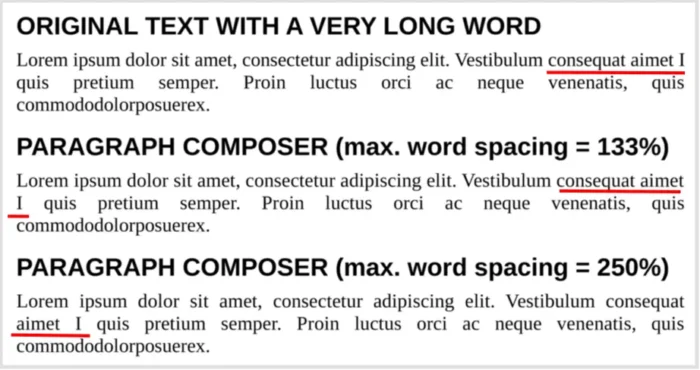
image from documentfoundation.org
The Calc app features new Shuffle command to randomly reorder cells in a range, and new Pivot Table Calculated fields.
It also improved RTL support, that typing right-to-left text into an empty cell automatically sets the direction of that cell to RTL.
As well improved Microsoft Excel XLSX compatibility with line breaks in referenced cells. And, XLSX form control elements now show up in the Navigator.
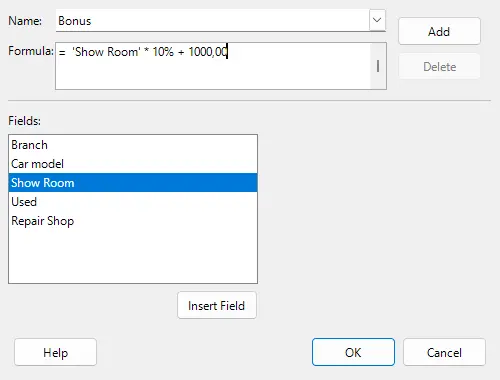
image from documentfoundation.org
Impress can now switch between numbered and bulleted lists. It features new Presentation Sections for organizing slides. Along with Draw, it also supports multiple page/slide sizes in one document.
For the UI, it now has native OpenType font variations support. So if a document uses a variable font with a particular weight or width, LibreOffice can preserve and display that variation correctly.
It now accepts font names in other languages, supports configuring per-document keyboard shortcuts, and theme color changes no longer require restarting the application.
Python scripts can now be created and edited directly from the Macro Manager without installing APSO. And, they can run either inside LibreOffice or as clients connecting to a LibreOffice server via pipe/socket.
Other changes include:
- The Math app got named functions and operators for the N’Ko and Adlam scripts, and left-pointing vectors and harpoons for right-to-left formulas.
- More paper sizes, including A0–A2 and B0–B3.
- Quick Find can now search comments.
- Faster loading large documents containing images.
There are as well a large amount of other changes. See the official release note for details.
How to install LibreOffice 26.8
LibreOffice 26.8 is available to download for Linux, Windows, and macOS in its website via the link below:
For Linux, besides waiting for your distribution updates, select download either rpm package for Fedora base or deb package for Debian/Ubuntu base. While, there are also official Flatpak and Snap packages (both are not updated at the moment) that run in sandbox.
And for Ubuntu, there’s an Ubuntu developer maintained PPA repository which contains the package with better integration, though, it always has some days or even weeks delay for the new major LibreOffice version.
Source: UbuntuHandbook