Obsidian vs Logseq: Which Note-Taking App Fits Your Workflow Better?
Obsidian and Logseq may seem similar. Both are local-first note-taking apps, both use Markdown, and both are popular among people building their personal knowledge base.
But after using both for nearly three years, I can say this: they are not the same kind of tool. Obsidian feels like a powerful Markdown writing environment. Logseq feels like an outliner built for connecting ideas at the block level.
Both applications use Markdown as their primary note format. However, Logseq is also actively developing a database-based version alongside its traditional Markdown workflow.
I have written several tutorials on both Logseq and Obsidian here on It's FOSS. One of the frequently asked questions in the comments of those articles has been about the differences between Obsidian and Logseq.
Of course, the major difference is that Logseq is open source and Obsidian is not. Yes, Obsidian is one of those tools that feel like they are open source even when they are not.
But that major difference is not a difference for many. They want to know which tool they should use for their perfectly curated knowledge base.
So, I decided to compare both Logseq and Obsidian on certain points that I have noticed in my experience. Instead of trying to declare one as the winner, I'll explain where each application works well, where I struggled, and why I still use both in my daily workflow.
Choose Logseq if you prefer outlining, daily journals, block references, open source software, and idea-first note-taking.
I personally use Obsidian for writing long text, articles and Logseq for collecting and connecting ideas.
This is not a recommendation to switch to one application or the other. It is simply a collection of my experiences and the workflow that worked best for me.
Here is a quick comparison before we go into the details.
| Feature | Obsidian | Logseq |
|---|---|---|
| Best for | Long-form notes, writing, structured vaults |
Outlining, daily journals, block references |
| Note format | Markdown files | Markdown/Org, moving toward database |
| Open source | No | Yes |
| Learning curve | Easier | Steeper |
| Linking style | Page/file-level links | Block-level references |
| Mobile app | More polished | Less polished, especially on Android |
| Plugin ecosystem | Larger | Smaller, but more built-in features |
| Portability | Better | Good, but more Logseq-specific structure |
Local Storage of Notes
How an application stores your notes is one of the most important aspects of any note-taking system. Fast access to your data and complete ownership of your notes are essential.
Fortunately, both Obsidian and Logseq follow a local-first approach.
Obsidian
Obsidian stores every note as a standard Markdown (.md) file inside a local folder called a Vault. Since all files remain on your computer by default, you have complete control over your data without depending on external servers or proprietary databases.
You can also create multiple vaults, allowing you to separate different projects or areas of work. Because everything is stored locally, your notes remain accessible even without internet connection.
Logseq
Logseq also stores notes locally using Markdown and Org-mode files. However, the project is gradually moving toward a local SQLite database architecture to improve performance, stability, and query capabilities.
Even with this transition, the developers have stated that they intend to continue supporting the traditional Markdown-based workflow for users who prefer plain text notes.
Like Obsidian, Logseq also allows you to maintain multiple collections of notes and switch between them easily.
Plain Markdown vs Logseq's Bulleted Markdown
Although both applications use Markdown, the editing experience is fundamentally different.
Obsidian
Obsidian follows the traditional Markdown editing approach, where an entire file becomes the main unit of work.
It is well suited for writing long articles, detailed documentation, or structured notes that resemble conventional documents.
Obsidian for Long form Notes
Logseq
Logseq is built around an outliner. Every line is a collapsible bullet, making each individual block the primary unit of information.
Outline Style notes in Logseq
Instead of thinking in pages, you naturally build ideas by nesting bullets and creating hierarchies through indentation.
Where Obsidian Feels Better for Writing
I use Obsidian whenever I'm writing article drafts or other long-form documents. Its editor feels much more comfortable for continuous writing, and organizing paragraphs is straightforward.
If you're writing regular articles or lengthy notes, Logseq can sometimes feel restrictive because everything starts as a bullet point.
I especially notice this when working with a table of contents. In Obsidian, the document structure is easier to visualize because there isn't a bullet interface surrounding every paragraph.
On the other hand, Logseq is excellent for collecting ideas before writing. Its outline-based interface makes it easy to brainstorm, collapse large sections into a single line, and gradually expand ideas whenever needed.
When you maintain proper indentation, every parent bullet can almost act as a separate note with all of its supporting information nested underneath.
Interlinking Notes
Linking related notes is one of the most important features of any PKM application because that's what separates it from just a random dump of notes and an organized, accessible knowledge base.
Obsidian
Obsidian connects notes by linking entire files using wiki-style links. It also includes a backlinks panel that shows every note linking to the current document.
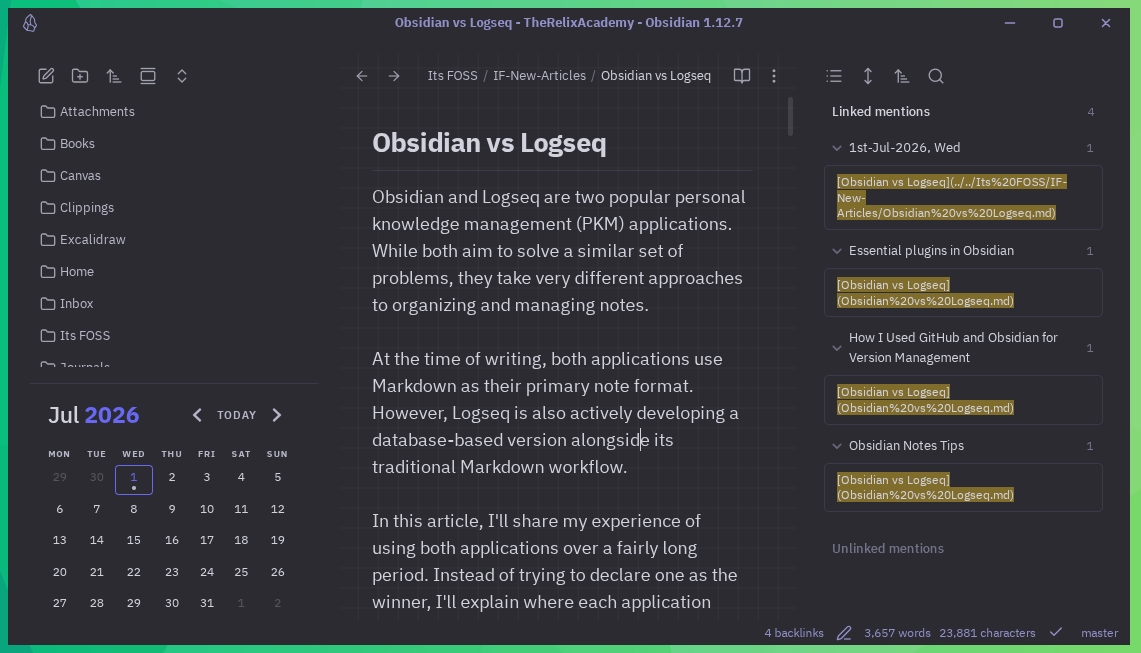
To visualize these relationships, Obsidian provides an excellent graph view that displays how your notes connect with each other.
Logseq
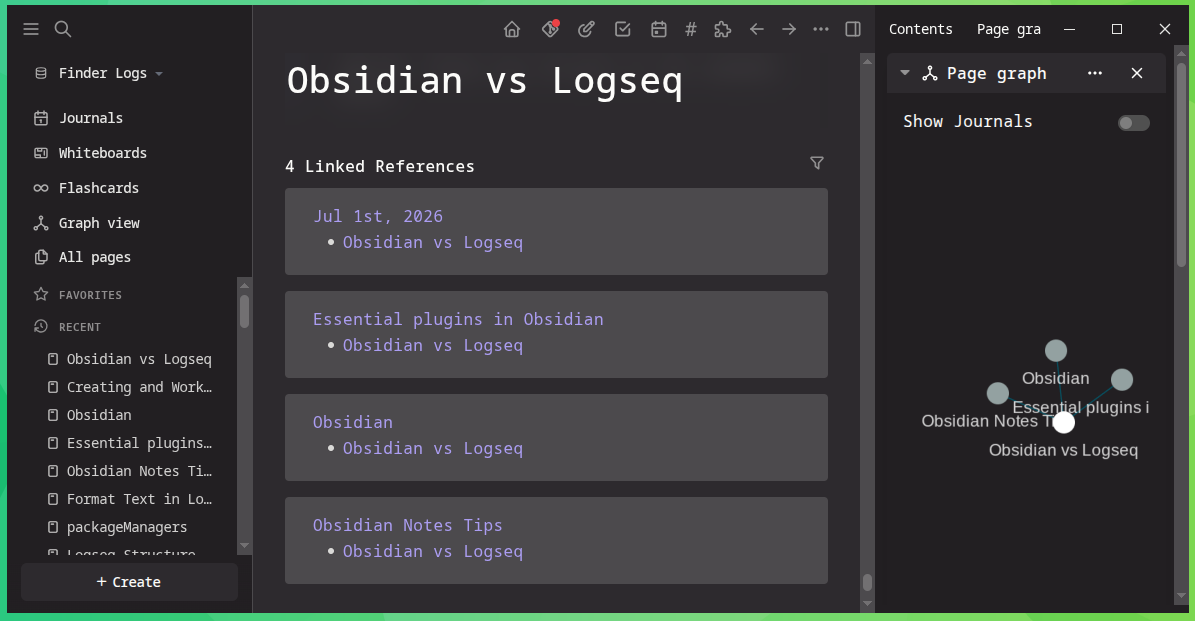
Logseq does things differently by introducing block-level references.
Instead of linking only to entire pages, you can directly reference or embed an individual bullet from anywhere in your knowledge base.
Like Obsidian, Logseq also includes a graph view to visualize relationships between notes.
Why I Prefer Logseq for Connected Notes
When it comes to interlinked notes, I prefer Logseq every time. The biggest reason is block-level references.
Because Obsidian links entire files, I often end up creating many small notes just so they can be referenced from different places.
Logseq removes that need. If I organize my ideas using proper indentation, I can reference only the specific block I need while leaving the rest of the information in the same page.
Even better, hovering over a reference displays the complete parent block along with its nested content.
This allows me to keep large collections of related ideas together while still being able to reference individual parts wherever I need them.
There is one thing to keep in mind, though. This workflow depends heavily on proper indentation. If the structure becomes messy, references may not include all the information you expected.
Overall, I think Obsidian works better if you're intentionally following a Zettelkasten-style workflow with a strict "one idea, one note" philosophy.
Personally, I believe that Zettlekasten is one of the best ways to organize knowledge. The challenge is that maintaining such a system consistently can become difficult over time.
File Storage Architecture
The way notes are organized on disk and inside the application is very different in Obsidian and Logseq.
Obsidian
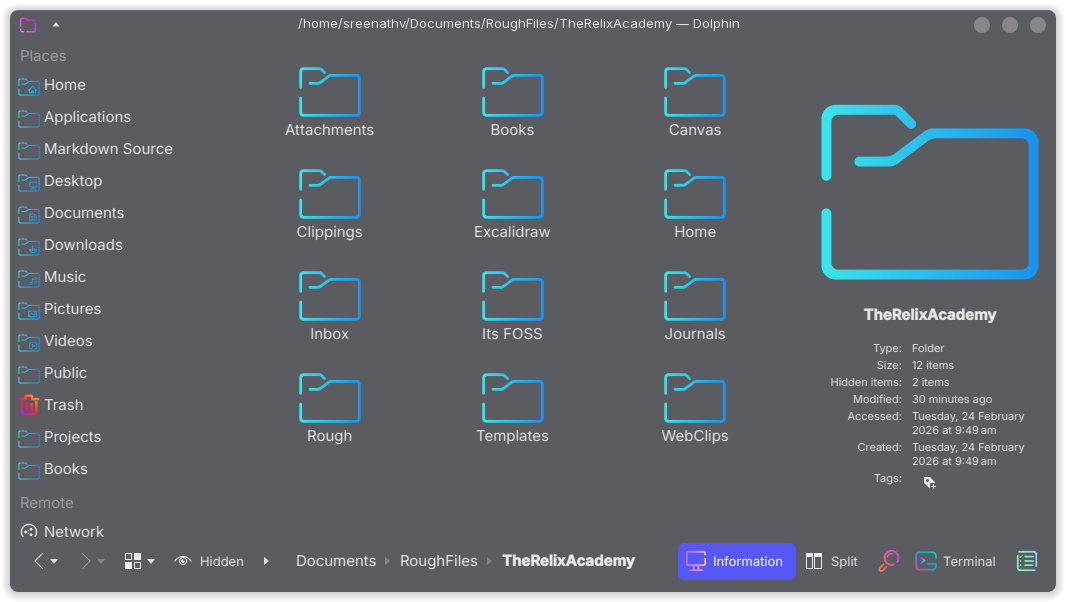
Obsidian follows the traditional file and folder approach. You are free to create any folder structure you like inside a vault, whether it is deeply nested or completely flat.
This gives you complete control over how your knowledge base is organized.
Logseq
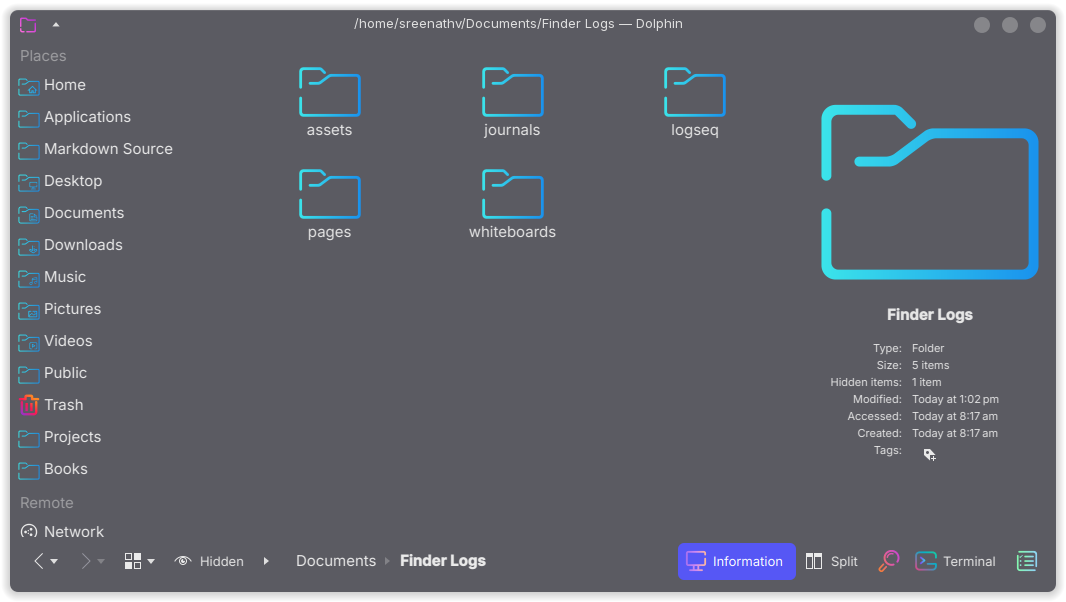
While Logseq, instead of relying on folders, encourages you to organize information using daily journals, pages, tags, and block hierarchies.
Rather than maintaining a directory structure yourself, the organization gradually emerges through links and references.
Why Obsidian is Easier for Beginners
For most casual users and students, I feel Obsidian's approach is much easier to understand.
Logseq's organization model can be confusing at first. By the time you fully understand how pages, tags, and journals work together, you may already have created hundreds of notes that need to be reorganized.
One thing that initially confused me was the relationship between pages and tags. In many situations, they almost behave like the same thing.
If you come from a traditional folder-based workflow, it's easy to start creating pages as if they were folders. That usually leads to confusion later when your notes begin to grow.
Obsidian, on the other hand, follows a familiar file-and-folder hierarchy that almost everyone already understands. Logseq's approach is certainly powerful, but it requires careful planning from the beginning.
Notes portability
Being able to move your notes between applications is an important consideration. If you ever decide to switch tools, a portable note format can save a lot of effort and frustration.
Obsidian
Obsidian stores everything as standard Markdown files. Because Markdown is widely supported, you can open your notes in almost any text editor without losing the main content.
This makes your notes easy to access in the future, regardless of whether you continue using Obsidian.
Logseq
Logseq also stores notes in Markdown, but its heavy use of block structures and internal block identifiers makes those files less suitable for use in traditional Markdown editors.
While it do provide a way to export the current page to a proper markdown, the default note you created is always in a bullet-structure form.
Which One Is Easier to Move Away From?
Although Obsidian is highly portable, there are still a few things to keep in mind. Obsidian's wiki links are not part of the Markdown standard. If you open those files in another editor, internal links and embedded images may not work as expected.
The same applies to some Obsidian-specific features such as callout blocks.
Fortunately, Obsidian allows you to disable wiki links and use standard Markdown links instead. If long-term portability is important to you, this is a setting worth considering.
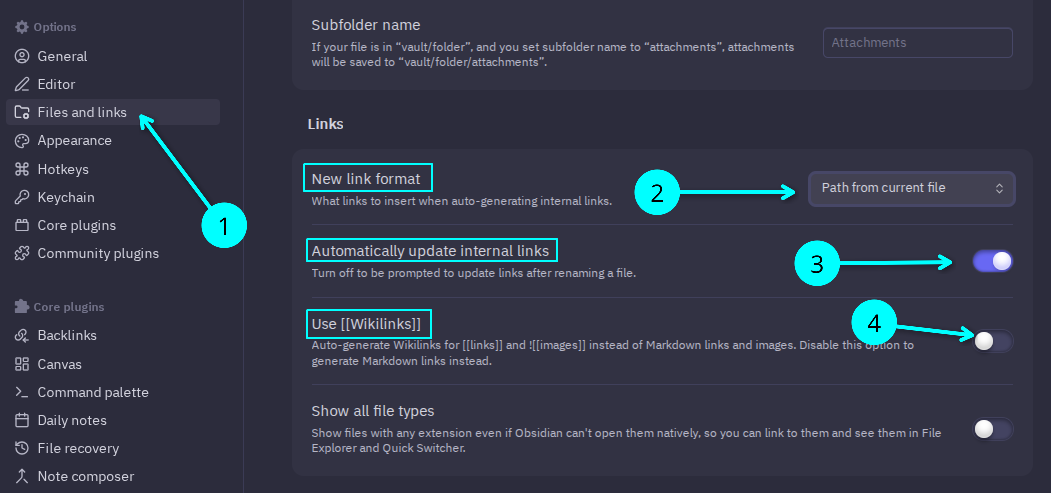
Logseq has similar limitations because it also extends Markdown with its own features.
Overall, I still find Obsidian's notes easier to migrate to other applications than Logseq's Markdown files.
Plugin Ecosystem
A healthy plugin ecosystem can greatly extend the capabilities of a note-taking application.
Obsidian
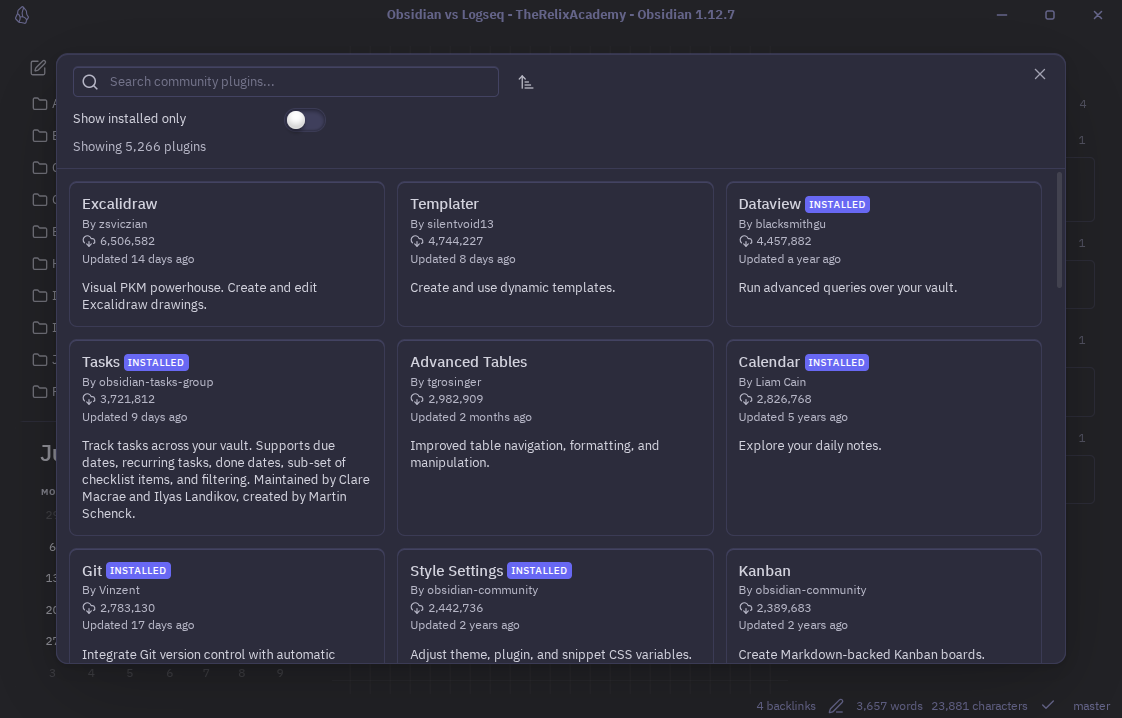
Obsidian has one of the largest plugin ecosystems available. Thousands of community plugins can transform the editor into anything from a task manager to a database-like system using plugins such as Dataview.
Because the core application remains fairly minimal, many advanced features depend on community plugins.
Logseq
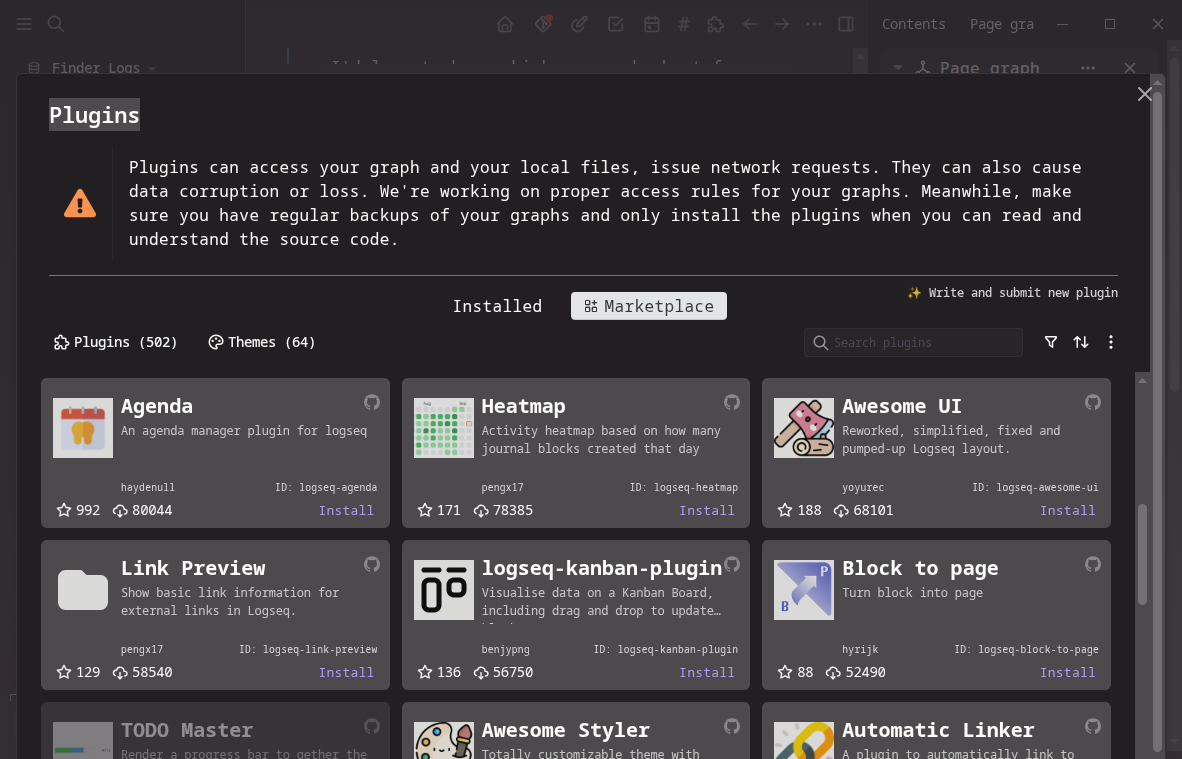
Logseq has a much smaller plugin ecosystem. However, it includes many features that Obsidian users often install plugins for, including flashcards, PDF annotation, and advanced queries.
Its philosophy is to provide most of the commonly used PKM features as part of the default installation.
Plugins vs Built-in Features: My Take
I actually give a thumbs up to the Obsidian's plugin model. Providing a simple editor and allowing users to choose only the features they need is a good design approach. Many modern applications, including Visual Studio Code, follow a similar philosophy.
The downside is that depending heavily on third-party plugins introduces additional security considerations.
Logseq takes the opposite approach by including most important features out of the box.
I repeat, one thing to remember for both applications is portability. Many plugins introduce their own syntax that goes beyond standard Markdown.
If your goal is to keep your notes compatible with other Markdown editors, it's worth being selective about which plugins you install.
Callout blocks are a good example. They work well inside the application but may not render correctly elsewhere.
Web Clipper
If you regularly save articles while browsing, a good web clipper becomes an essential part of your workflow. Though, you only need one reliable web clipper.
Obsidian
Obsidian offers an excellent web clipper extension that is available for Chrome, Firefox, Safari, and other browsers.
It lets you save web pages as Markdown notes. When used with Obsidian, the clipped notes are automatically populated with useful YAML front matter such as the title, source URL, author, and other metadata.
Logseq
At the time of writing, Logseq does not have an official web clipper. There have been ongoing discussions about one, but an official release is yet to arrive.
Why Obsidian’s Web Clipper Is More Useful
One thing I really like about the Obsidian Web Clipper is that it doesn't require Obsidian to be installed.
This means I can use it to save web pages as Markdown and then import those notes into other applications, including Logseq.
The only feature you miss without Obsidian is the ability to send clipped notes directly into a specific vault or folder with a single click. That integration naturally requires Obsidian to be installed.
Sync Features
Working on more than one computer? Sync is essential for your workflow.
Obsidian
Obsidian provides its own paid synchronization service called Obsidian Sync. I have used it extensively, and it has worked very well for me.
Since all notes remain local files, you can also use other synchronization solutions such as iCloud, Dropbox, or Syncthing instead of paying for the official service.
One thing worth mentioning is Android. Services like Dropbox and Google Drive do not automatically live synchronize a local folder in the background because of Android's storage restrictions.
This is not an Obsidian limitation. If you want continuous synchronization on Android, tools such as Syncthing generally provide a much better experience.
Logseq
Logseq also offers its own paid synchronization service.
Users can choose alternatives such as iCloud, although it has been known to have occasional issues.
The upcoming database version is also expected to improve real-time synchronization and collaboration between multiple devices.
My Sync Setup and Why I Avoid Direct Comparison
I personally don't use Logseq Sync. Instead, I keep my Logseq graph inside a private GitLab repository to avoid accidental data loss.
Because of that, I don't think it would be fair for me to compare the official synchronization services of both applications. If you've used both, I'd be interested in hearing about your experience in the comments.
Mobile Application Availability
A good note-taking application should work well on mobile devices too. After all, we don't always have a laptop with us.
Obsidian
Obsidian offers official mobile applications for both Android and iOS. In my experience, the app works very well, and Obsidian Sync integrates seamlessly across devices. Since I'm the only person using my vault, I haven't tested its collaboration features, so I won't comment on them.
Logseq
Logseq's mobile experience is currently less polished. There isn't an official Android app for the legacy Markdown version on the Play Store.
Android users can still install it by downloading the APK from the official GitHub repository. iPhone users, however, have an official release available on the App Store.
The new database version is currently being developed with iOS as the primary focus, and an Android release is not expected anytime soon.
Where Obsidian Feels Ahead on Mobile
Regarding Obsidian, one thing I did notice is that the interface can feel a little crowded on smaller screens. The ribbon menus, sidebars, and other interface elements take up a fair amount of space. If you prefer larger fonts while reading or writing notes, the interface can feel even more compact.
I rarely use Logseq on my phone, so I don't think I can fairly judge its mobile experience. It will be unfair if I tried it for the sake of this article, so I leave it to those who use it frequently to judge it, and I'd love to hear your thoughts in the comments.
Git Integration Possibilities
Git is not only an excellent version control system but also a reliable synchronization solution for users who prefer not to use paid cloud services.
Obsidian
Since an Obsidian vault is simply a folder containing Markdown files, it works naturally with Git.
You can store your vault in a private GitHub or GitLab repository and manage its history using standard Git workflows.
In this setup, version history depends entirely on Git rather than the application itself.
Git in Obsidian
Logseq
Logseq also works well with Git when using the Markdown version. Its upcoming database architecture introduces another interesting feature.
Instead of relying entirely on Git history, the database is designed as a "time-travel database." Every change is stored as a timestamped transaction, allowing you to inspect previous states of your knowledge base directly from within the application.
0:00
Git in Logseq
How I Use Git With Both Apps
Both applications provide community plugins that simplify Git operations through a graphical interface.
Between the two, I found Obsidian's Git plugin more polished and easier to understand. It exposes almost every Git operation you might need through a straightforward interface.
Ironically, I rarely use either plugin. I manage my repositories using Lazygit, so I generally prefer handling Git from the terminal.
Open Source vs Proprietary
The licensing model of an application doesn't necessarily affect how well it works, but it is still an important consideration for many users.
Obsidian
Obsidian is proprietary software. The application itself is closed source, meaning only the developers have access to its source code.
It is free for personal use, while commercial use requires a paid license. One important point is that many community plugins available for Obsidian are open source, even though the application itself is not.
Logseq
Logseq is fully open source under the AGPL-3.0 license. Its source code is publicly available, and anyone can inspect, modify, or fork the project.
All local features are available without requiring any payment.
Why I Still Use Obsidian Despite It Being Closed Source
Almost every application I use daily is open source. Obsidian is one of the few exceptions.
There are several reasons for that. I've been using it for a long time, migrating my notes without breaking links would take considerable effort, and I simply don't have enough time to rebuild my entire knowledge base.
Another reason, is the writing experience. For long-form writing, Obsidian is still one of the fastest and most comfortable editors I've used.
My long-term goal is to move toward a completely plain-text, wiki-style note system, but that is still some distance away.
Default Entry Point and Daily Workflow
One of the first things you'll notice when trying a new PKM application is how it expects you to work.
Obsidian
Obsidian starts with a blank note or an existing document. From there, you're free to organize your vault however you like.
You can create folders, move notes between them, and rearrange your structure whenever needed.
Because Obsidian automatically updates internal links, reorganizing notes is generally painless.
Logseq
Logseq is different. Every time you open the application, you're greeted by today's journal.
The idea is simple. Open the application, start writing, and organize everything later using links, pages, and tags.
Why Logseq’s Journal-First Workflow Needs Planning
This journal-first workflow is one of Logseq's biggest strengths, but it also comes with a learning curve.
Personally, I recommend spending some time understanding how Logseq works before filling it with notes.
Learning while building your knowledge base can easily lead to unnecessary pages, duplicate tags, and organizational problems that become frustrating to fix later. At least, that's exactly what happened to me.
Theming Support
A note-taking application should also be pleasant to use. If you enjoy the interface, you're more likely to keep coming back to read and write.
Obsidian
This is one area where Obsidian stands out. Thanks to its large community, there are hundreds of themes available, along with plugins that let you customize almost every part of the interface.
I personally use the Border theme most of the time. Combined with the Style Settings plugin, it lets me customize Obsidian exactly the way I want.
Occasionally, I switch to Retroma, which has a unique appearance that I really enjoy.
Retroma Theme in Obsidian
Logseq
Logseq isn't far behind, but its theme ecosystem is much smaller.
There are still several good community themes available, although they don't offer the same level of customization as Obsidian.
I usually switch between the Immersion Dark and Bonofix Dark themes.
If you're comfortable editing CSS, you can customize Logseq even further. However, I wouldn't recommend that approach to beginners who simply want to install the application and start taking notes.
Importing Notes Between Obsidian and Logseq
Both Obsidian and Logseq let you work with Markdown files, but moving an existing knowledge base from one application to the other is not as straightforward as it sounds. The biggest reason is the difference in how each application structures notes.
According to the documentation, you can import a folder of Markdown files into Logseq. In practice, however, the results may not always be ideal.
Because Logseq is built around an outline-based structure, imported Markdown files don't automatically adopt its bullet hierarchy. This becomes even more noticeable if you're using the Table of Contents plugin, where the structure may not appear as expected.
If you're particular about keeping your notes properly organized with consistent bullets and indentation, you'll likely have to spend time manually restructuring many of the imported notes.
Obsidian handles Logseq notes a little better. You can simply copy the Markdown files from Logseq's pages folder into an Obsidian vault, and the bullet structure is generally preserved. However, headings and overall formatting may still need some cleanup.
If you've built a large knowledge base in either application, migrating it perfectly to the other is difficult. The underlying architecture of the two applications is simply too different to make the process completely seamless.
Who Are Obsidian and Logseq For?
Although both applications solve similar problems, I think they are designed for different kinds of users.
Choose Obsidian If
You write long-form notes, prefer traditional files and folders, and enjoy customizing your workspace through plugins. It works particularly well if you're willing to invest time in organizing your knowledge base and maintaining a structured note system.
Choose Logseq If
You naturally think in outlines and bullet points. Its journal-first workflow, block-based organization, built-in flashcards, and PDF annotation tools make it an excellent choice for quickly capturing ideas before organizing them later.
It is also a strong option for users who prefer fully open-source software.
How I Use Them Both
For a long time, I've used both applications side by side.
I wouldn't generally recommend this approach unless you're comfortable managing two separate knowledge bases every day.
In my workflow, Obsidian is where I keep long-form notes, article drafts, and web clippings.
Logseq is where I quickly capture ideas, maintain journals, and collect thoughts before they grow into larger pieces of writing.
This workflow still works well for me because my overall note collection is manageable.
As my knowledge base continues to grow, however, I expect to simplify everything into a system that's easier to maintain over the long term.
Wrapping Up
This article was never meant to declare one application objectively better than the other. Obsidian and Logseq reflect two different ways of thinking about notes.
Obsidian works better for me when I need a polished writing environment. Logseq works better when I want to collect, nest, and connect ideas quickly.
At the end of the day, the best note-taking app is the one that fits the way you actually work.
Which one do you use: Obsidian, Logseq, Joplin, Zim Wiki, or something else? Share your workflow in the comments.

Source: It's FOSS