Rustdesk 1.4.7 Released with Deploy Option for Android Device
Rustdesk, the popular rust written remote desktop application for Linux, Windows, macOS, Android, and iOS, released new 1.4.7 version a few days ago.
The new version of this free open-source application introduced some new features, security improvements, and various bug-fixes.
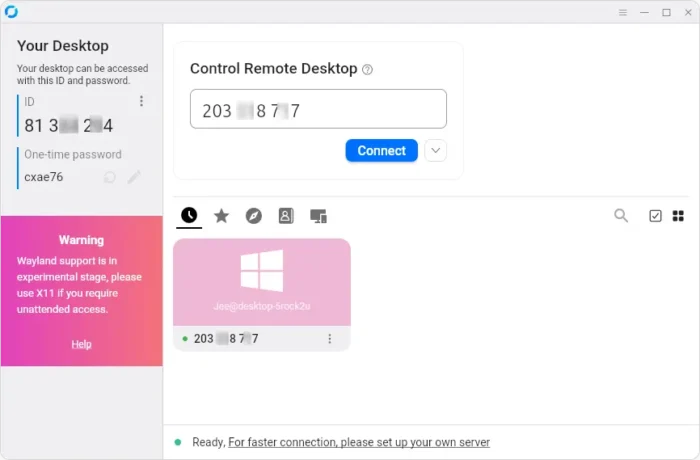
RustDesk client in Ubuntu Desktop
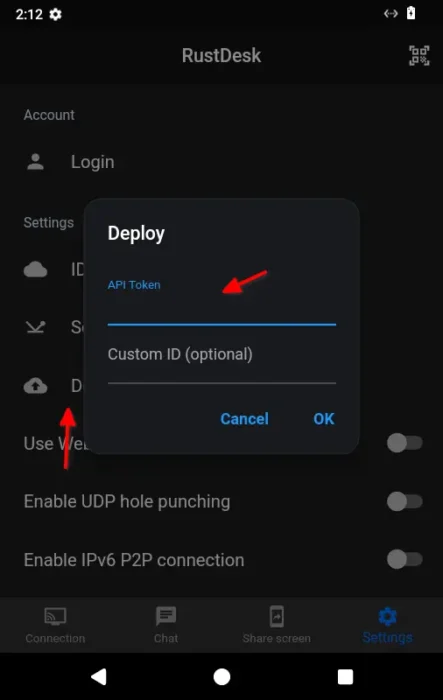
First, Rustdesk 1.4.7 introduced new Deploy setting option for Android client. Meaning user can now use API token to register Android devices to RustDesk server and auto-set everything up.
As you may know, Rustdesk works out-of-box by using its public server as a bridge (only for establish connection, P2P afterwards) when connecting to a remote desktop. For security and faster connection, user may set up a self-hosted server.
The open-source server is great for hosting small number of clients. The client needs to manually input the server IP and key for registering, then set up the permissions (e.g., remote input, file transfer, clipboard, camera, etc), security, codec etc settings.
For companies / IT admins that have many or lots of PC or mobile devices, the API token (only available via RustDesk Server Pro) is more efficient. Without manually register and configure settings in clients one by one, it automatically registers client to your server, syncs server settings, and allows to manage clients centrally.
And, with version 1.4.7 it now supports the deployment flow for Android devices.
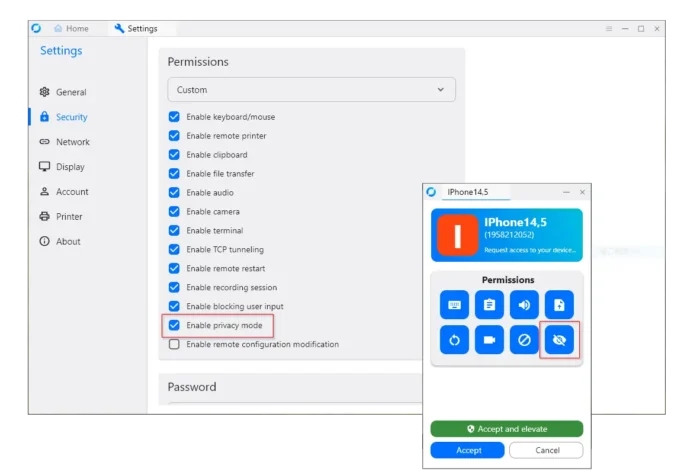
The new version also added new “Enable Privacy Mode” permission control in settings and connection UI for macOS and Windows. And the Privacy Mode controls are now only shown/usable in the controlling side when permitted in the controlled side.
And for macOS, it now allows to switch monitor during privacy mode, removing the previous restriction that required switching to Display 1 first.
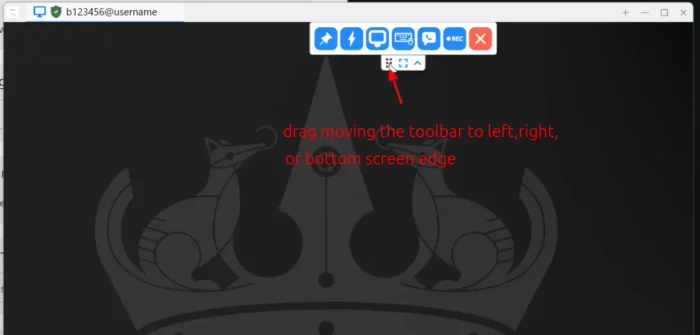
As you know, the remote session window has some control options via the top tool-bar. And, it includes a 6 dots handle icon allowing to drag moving left or right.
In version 1.4.7, there’s a new “Allow docking remote toolbar to any window edge” setting option available. With the option enabled, you can now drag moving the tool-bar to left, right, or bottom screen edge. The tool-bar will turn vertically or horizontally automatically, and, it will remember and restore its status at next launch.
To protect from brute-force attacks, the new version now automatically re-create one-time password after 10 consecutive login failures, and it resets the count after a successful one-time-password authentication. When one-time password re-creation occurs, it logs with a warning that includes the failure count and connection IP.
There are as well other security improvements, such as new permanent password storage format, dedicated OS-credential failure policy, Windows terminal OS-login concurrency gate, as well as Linux headless OS-auth checks before desktop startup, and record password failures for failed headless X-session login attempts.
Other changes include:
- Add minimal deploy command to send a deployment request.
- Ability to allow command-line settings when “Disable settings” enabled for UI.
- Option to hide the “Stop service” menu item and button across desktop, mobile, and system tray interfaces.
Get RustDesk 1.4.7
For more about the new version, as well as the installer packages for Linux, Windows, macOS, Android, and iOS, go to Github via the link below:
For Linux, besides the Ubuntu (.deb) and Flatpak package at the top of link page, there are as well RHEL/Fedora, Arch, and universal AppImage packages available for downloading in the “Assets” section.
And, if you don’t even know which architecture type to choose, run uname -m command in terminal to tell.
Source: UbuntuHandbook