Darktable 5.4.1 Released with Few Dozen Fixes [Ubuntu PPA Updated]
Darktable, the free open-source photography app and raw developer, released new 5.4.1 version one day ago.
This is a minor release that focuses on bug-fixes, stability improvements, as well as camera support changes and translation updates, but no new features.
First, the new version fixed possible crashes in the situations, when mounting a camera from Darktable due to the current locale, when using workspace due to the non deterministic ordering of the list of workspace read on disk, and when parsing highlight-preservation Exif tag while loading some Olympus ORF files.
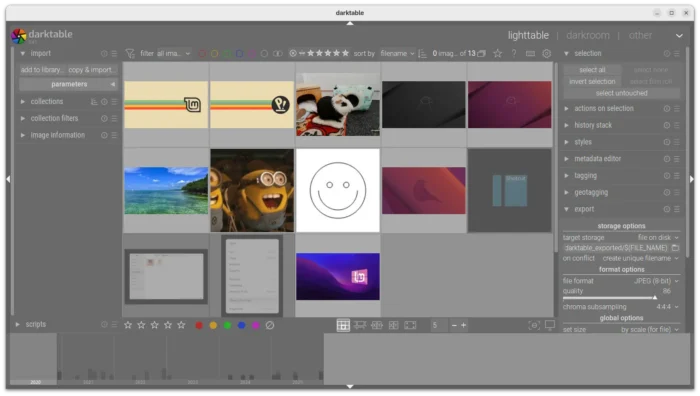
It also fixed wrong handling of scaling factor during multi-preset export, wrong handling of overwrite if changed in export, and wrong RAW specific auto-applied preset being applied to non RAW images.
There are as well fixes for subtle color casts in bayer dual demosaicers, mask support in scale pixels module, and possibly outdated metadata when returning from darkroom.
Besides bug-fixes, the new version also updated Lua API to v9.6.0, added noise profiles for Canon EOS 10D and Sony ILCE-7CR.
Image by Chanzj from Pixabay
It however suspended support for Creo/Leaf Aptus 22(LF3779)/Hasselblad H1, Fujifilm IS-1, Kodak EasyShare Z980, Leaf Aptus-II 5(LI300059)/Mamiya 645 AFD, Leaf Credo 60/80, Olympus SP320, Phase One IQ250, and ST Micro STV680.
And, it misses compression mode support for Apple ProRAW DNGs, CinemaDNG lossless (Blackmagic, some DJI, etc.) and lossy (Blackmagic), DNG 1.7 using JPEG XL (Adobe enhanced, Samsung Expert RAW), Fujifilm lossy RAFs, Nikon high efficiency NEFs, Phase One other than IIQ L, and Sony ARW 4.0/5.0 downsized lossless and ARW 6.0 lossy.
How to Install Darktable 5.4.1
The official release note as well as the installers for Linux, Windows, macOS, and source tarball are available in Github via the link below:
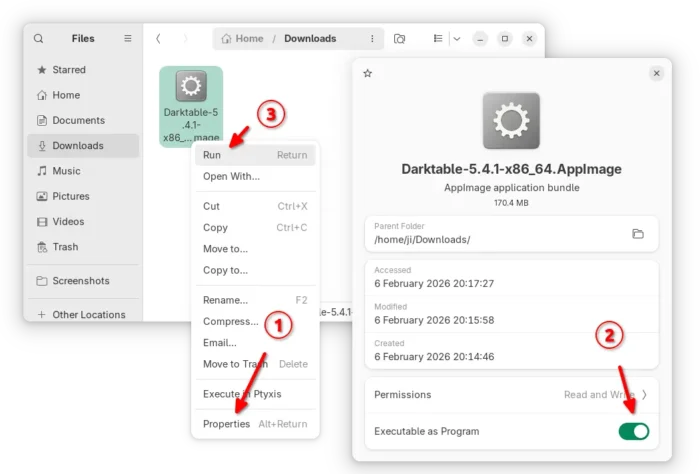
Linux user may select download the AppImage, then add executable permission and run to launch the software.
There are as well Snap package available in Ubuntu Software (or App Center), and Flatpak package that works in most Linux. Though both of them are not updated at the moment of writing.
For those who prefer the native package formats, the official .deb/.rpm packages for Debian, Ubuntu, Fedora, and openSUSE are available to download at this page.
And, for Ubuntu users who prefer Ubuntu PPA, I’ve built the 5.4.1 version into this unofficial PPA for Ubuntu 22.04, Ubuntu 24.04, and Ubuntu 25.10.
Simply open terminal (Ctrl+Alt+T) and run the 3 commands below one by one to add PPA, refresh cache and install the deb package:
sudo add-apt-repository ppa:ubuntuhandbook1/darktable
sudo apt update
sudo apt install darktable
Source: UbuntuHandbook