Ubuntu 26.04.1 Released with the Annoying Spinning Cursor Fixed

Ubuntu 26.04.1, the first point release for the latest LTS, was released last night!
The new version of this long term support Ubuntu edition fixed a large amount of issues, and added some
new touchpad, fingerprint reader, and sound devices support.
First, the new point release fixed some issues upgrading from 24.04/25.10 to 26.04. And, it changed the default behavior for the release upgrader to LTS, instead of normal that checks every newer Ubuntu releases.
For Ubuntu Desktop, it fixed the annoying cursor spinning after launching an app, as well as the cursor does not change issue in popup window.
It also fixed broken popup menus and clipboard interaction in multiple Snaps, and snap app window association issue to prevent wrong icon in the desktop dock and overview.
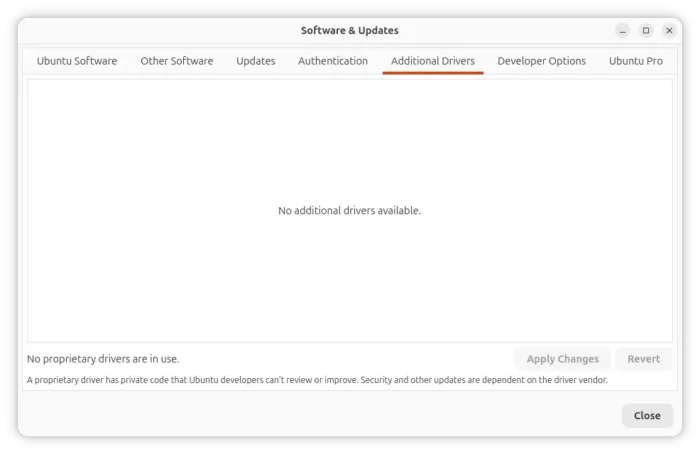
For those who still use the graphical “Software & Updates” (and Additional Drivers) utility, which is no longer preinstalled, it has been updated with fix for detecting drivers and crash on selecting manually installed driver.
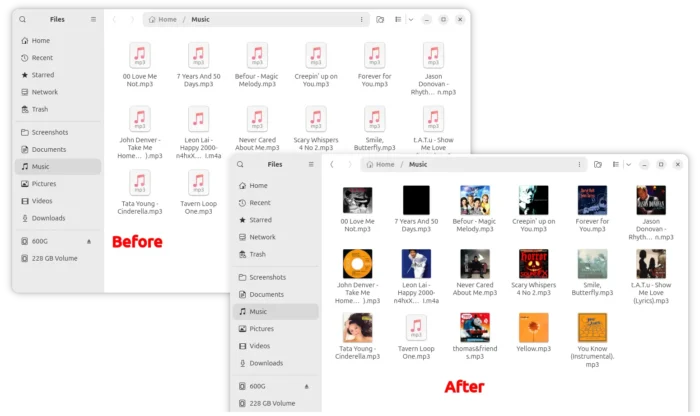
Nautilus, the Files app, now shows thumbnail previews for audio/video files, and it does no longer display huge icon for .ova files in list view.
It fixed occasionally crash when navigating fast through directories caused by some broken logic in GTK4, and crash when trying to open a bookmark from the context menu in the Ubuntu Desktop dock.
The default focused action for a “permanent deletion” confirmation dialog now is Delete instead of Cancel, and, the Nautilus progress bar on Ubuntu Dock icon now updates correctly.
Packagekit, the API/service that App Center uses it to interact with apt, now use the same newer APT solver that the apt command already uses. And the safety bug when uninstalling software has been fixed.
For Transmission users, the “Open” torrent dialog previously did not work due to AppArmor profile. Now, it works via a patch.
Other desktop fixes include:
- Gnome Shell may crash and log out after monitor hot-plugging.
gdctl showmay crash when the monitor has no software backlight control.- Cannot use touchscreen to drag and drop files within the same window.
- Deb file and snap:// URIs are not opened by App Center by default after installed gnome software.
- Miss “Ubuntu Desktop” settings after upgrade from 25.10/24.04, without ubuntu-desktop-minimal.
For QEMU machine emulator and virtualizer, this version fixed that issue that qemu-guest-agent does not start automatically.
It also fixed the missing support for Zicbop extension in KVM guest, and qemu-kvm-init does not load kvm module on riscv64.
Ubuntu 26.04.1 also updated its kernels, that fixed hardware protection shutdown issue on Qualcomm X1 SoCs, secure boot broken in intel-ipu7, and system hangs after suspend on HP systems (CID: 202603-38534) with AMD Ryzen.
It as well enabled Realtek ALC287 + Cirrus CS35L56 Audio for Lenovo Yoga Pro 7, fixed RTL8192EE PCIe WiFi card support and second tbt storage (plugged on the dock) recognition.
The point release also include new hardware support! They include:
- Add driver for egis_etu905 fingerprint reader [1c7a:05ae].
- Add quirks support for Elan touchpad 04F3:3355.
- Add quirks support for Synaptic touchpad 06CB:D024.
- Add Nvidia GB300 ALC4080 support.
- Add support for CS42L43B variant on New Intel WCL platform.
- Add firmware for Cirrus Amps for some Lenovo laptops (17aa235c 17aa235d).
Get Ubuntu 26.04.1
The official announcement as well as the download links are available in Ubuntu website via the link below:
For the full changelog, see the Ubuntu Discourse page.
Source: UbuntuHandbook