LXQt 2.4.0 Released with Continued Wayland Improvements

LXQt, the lightweight Qt-based Linux desktop environment, released new 2.4.0 version yesterday.
The new version of this free open-source desktop improved Wayland, multi-monitors, and sandboxed apps support, and fixed many issues.
For Wayland, the visibility of the desktop items with multiple screen setup is consistent now, and, each monitor now has its own “Hide Desktop Items” setting options.
X11 and Wayland now have separated settings page. The main menu can be opened now on Wayland too by adding a shortcut for lxqt-qdbus openmenu in the compositor settings. And, the shortcut selectors in panel menus are disabled and a tooltip about how to configure it is added.
For laptops, the idleness option for turning off monitor(s) now has separate settings for both the cases running on battery and with AC power connected.
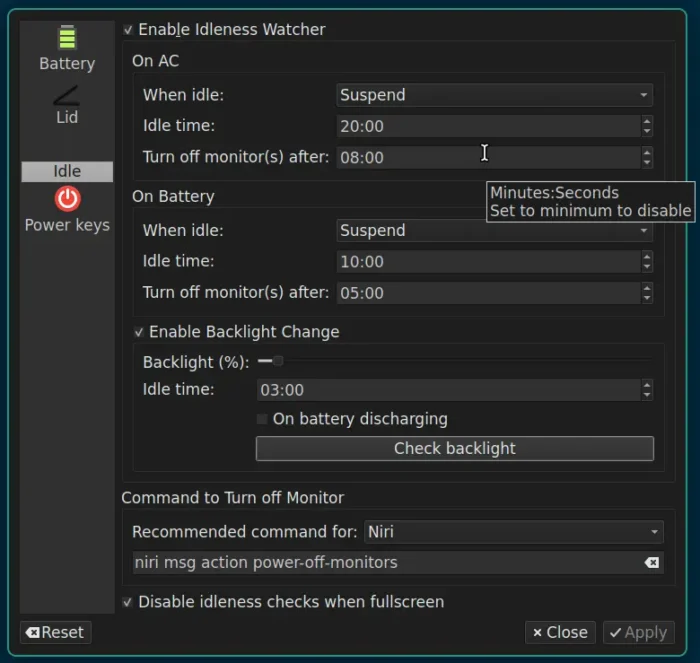
image from lxqt website
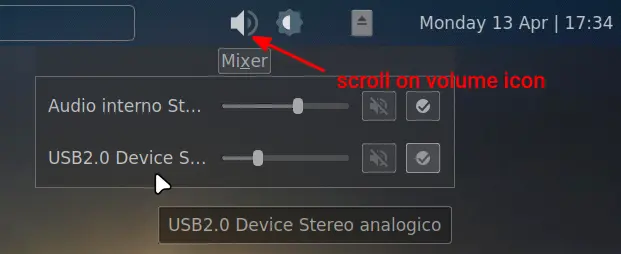
The volume indicator in the system tray area has been updated with a horizontal layout, and ability to display all available sinks. And, user can now move cursor over the indicator icon, and use mouse wheel or touchpad scrolling to change volume.
The new version also added new org.freedesktop.impl.portal.Access protocol for sandboxed apps (e.g., Flatpak apps) to request access permissions to e.g., camera or microphone.
It updated the “Do not disturb” mode to also ignore the transient notifications, e.g., titles of songs from players and similar. And, it implemented $XDG_STATE_HOME base directory to tell where applications should write state data, such as logs, history files, and internal databases.
Other changes in LXQt 2.4.0 include:
- Auto highlight the default file-name in file save dialog.
- Support shortcut for lock button of dropdown mode in QTerminal.
- Remove Imgur upload option for the screenshot tool.
- Add “Nord” theme for QTermWidget.
- Add OSC 7 escape sequence support for tracking current working directory.
- Support logout from
SystemdProvider. - Start calculator on numbers for lxqt-runner.
There are as well many other improvements and fixes in the release, see the official release notes for details.
Get LXQt 2.4.0
The LXQt source tarballs are available to download in the Github page.
For average users, it’s recommended to wait for your Linux distribution updates. And Ubuntu users may try out the official LUbuntu flavor, which however features LXQt 2.3.0 so far in the upcoming 26.04.
Source: UbuntuHandbook