Ubuntu 26.04 Now Shows Sudo Password Asterisk Feedback [How to Restore]

Ubuntu 26.04 LTS finally breaks the longstanding security tradition by now displaying the asterisk feedback when typing sudo password in terminal or command console.
As you know, most Linux distributions by default do not show any feedback when user is inputting password in terminal or any other command console for sudo authentication.
This is NOT friendly for users who are new to Linux. User may think something (either keyboard or system) is broken and get stuck at the password input, and, some even report it as a bug.
Indeed, it’s a 46 years of Unix security tradition to prevent shoulder surfers (people who looking over your shoulder) from guessing the length of your password.
It’s a feature, but not bug, most Linux distributions keep this decision, though many users request for enabling the visual feedback.
There’s a pwfeedback option allowing user to manually enable the password feedback, though it had a vulnerability issue that’s been fixed since version 1.8.31. And, some Distros (such as Linux Mint and elementary OS) has the option enabled out-of-the-box.
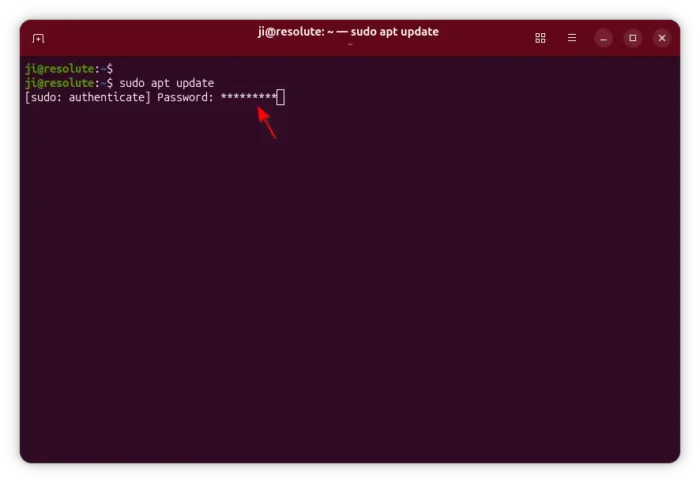
Ubuntu 26.04 shows asterisk feedback for sudo password authentication
As you may know, Ubuntu since 25.10 switched to sudo-rs, a rust-written memory safe implementation of sudo and su.
The sudo command is now linked to the rust-based sudo-rs, so for end users it works visually just like before.
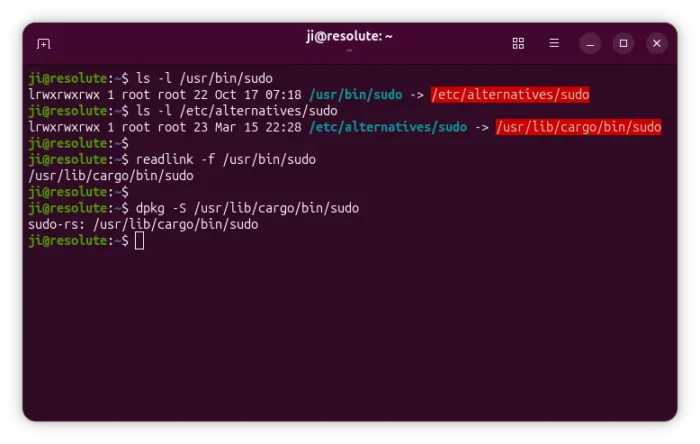
sudo in ubuntu 26.04 is link to rust-based sudo implemention
The sudo-rs upstream enabled pwfeedback option by default by releasing version 0.2.13, and implemented a feature allowing to press TAB to turn off the visual feedback at password prompt.
This fixes a major UX pain point for new users. Security is theoretically worse since password lengths are exposed to people watching your screen, but this is an infinitesimal benefit far outweighed by the UX issue. Outside of sudo/login no other password entry interfaces omit asterisks (including others on Linux).
Ubuntu 26.04, so far has version 0.2.12, backported the feature (but no TAB key disable function), so it now displays asterisk feedback when inputting password in command line.
How to Disable the Password Asterisk Feedback
Not only for Ubuntu 26.04, the steps below also work in Linux Mint 21/22.
And, current Ubuntu 20.04 ~ 24.04 may enable password feedback by following steps below but remove the exclamation point (!)
Different to Linux Mint, the behavior in Ubuntu 26.04 with sudo-rs is implemented by embedding configuration value into source code. Though, user may override it by adding a custom rule.
- First, press
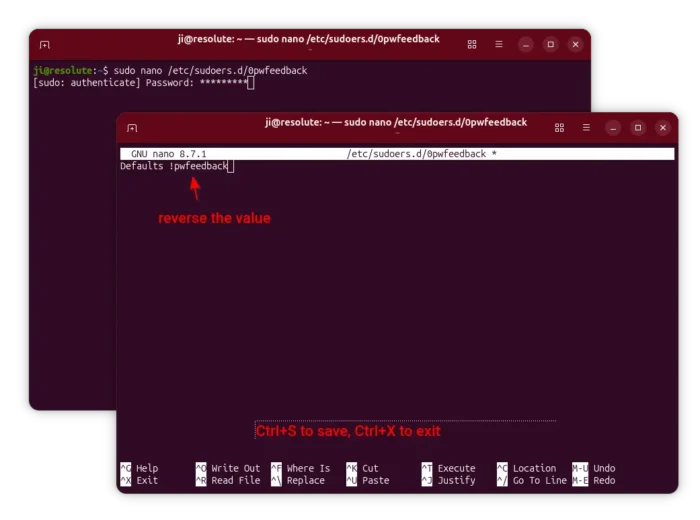
Ctrl+Alt+Ton keyboard to open up terminal window. When it opens, run command:sudo nano /etc/sudoers.d/0pwfeedback
This command will create
0pwfeedbackfile under/etc/sudoers.ddirectory (just like Linux Mint does) and open it with nano command line text editor. - When file opens, simply insert the line below:
Defaults !pwfeedback
NOTE: there’s an exclamation point (!) before
pwfeedback, meaning to reverse that value!
For Linux Mint, add an exclamation point (!) to the existing pwfeedback option instead of adding new line.
Finally, press Ctrl+S to save, and Ctrl+X to exit nano command line text editor. And, the change will apply immediately!
Source: UbuntuHandbook